Business policies,
one screen at a time.
eBay needs a payment, postage and return policy on every listing. Make them once, the way card sellers do, and bulkcard attaches them to every card you publish.
eBay Australia is changing this on 1 December 2026. eBay says business policies will only be available to Pro sellers from that date (eBay help). We’ll post what bulkcard sellers need in the Discord #announcements channel. Set your policies up now either way.
The pictures are real eBay Australia screens, filled in with example values. Numbered markers point at what to fill in, and the list under each picture explains each number.
Step 1 of 7 · about 1 min
Turn on business policies
Sign in to eBay, open ebay.com.au/bp/policyoptin and press Opt in. You only do this once per eBay account. Already opted in? The link takes you straight to Manage business policies, so skip ahead.
Tip: If eBay won’t opt you in, finish your seller registration first (payout and ID details), or contact eBay customer service.
Step 2 of 7 · about 1 min
Open Manage business policies
Go to ebay.com.au/bp/manage. You’ll make four policies here.
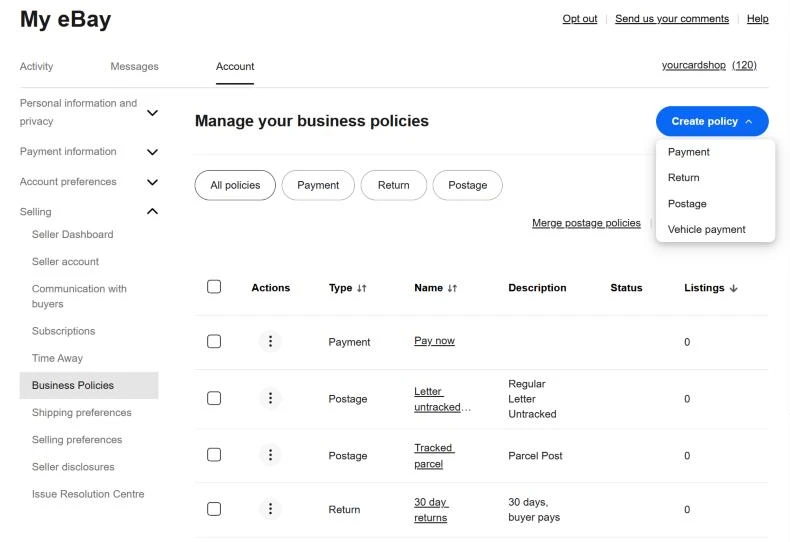 12345
- 1You’re in My eBay → Account → Selling → Business Policies.
- 2Open Create policy.
- 3Pick Payment first, then come back for Postage (twice) and Return. Ignore Vehicle payment.
- 4Never press Opt out: it deletes every policy you’ve made.
- 5Your finished policies are listed here. bulkcard shows the same names, so keep them clear.
Step 3 of 7 · about 2 min
Create a payment policy
One payment policy covers every card you sell.
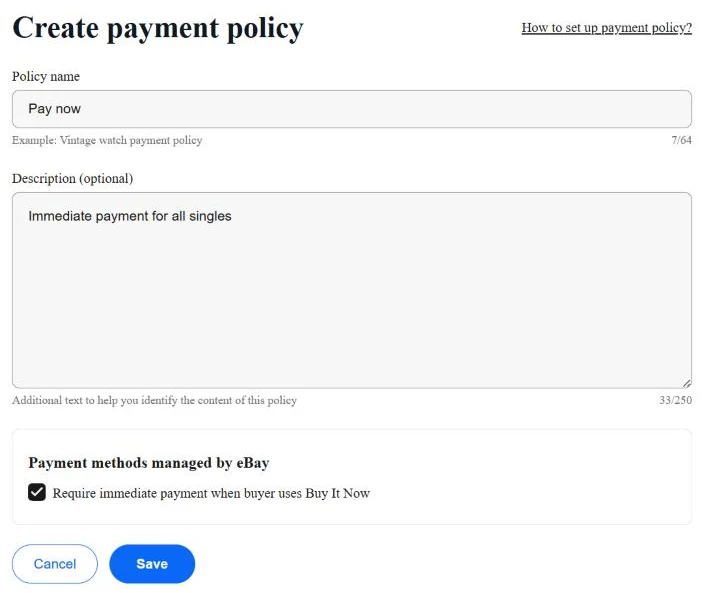 1234
- 1A name you’ll recognise, like Pay now. Up to 64 characters.
- 2Optional. Only you see the description.
- 3Require immediate payment when buyer uses Buy It Now is ticked already. Leave it on, so you never post a card that wasn’t paid for.
- 4Press Save.
Step 4 of 7 · about 3 min
Create a letter postage policy for singles
Most singles go in a plain envelope. Choose Create policy → Postage and name it something like Letter untracked – singles. Then press Add primary service.
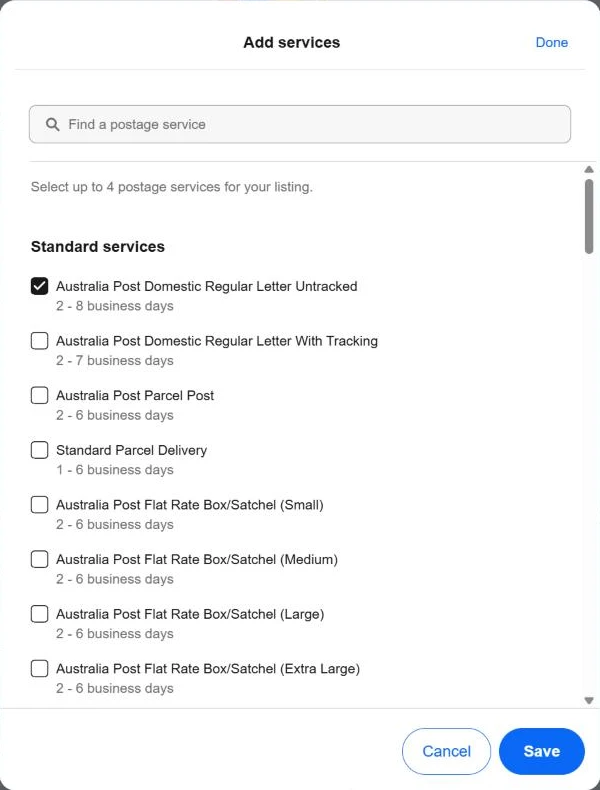 123
- 1Tick Australia Post Domestic Regular Letter Untracked. It’s one of the few services eBay lets you send without tracking.
- 2Not Regular Letter With Tracking unless you really buy tracking. Picking a tracked service and posting untracked loses “item not received” cases.
- 3Press Save to add the service to your policy. This doesn’t save the policy yet.
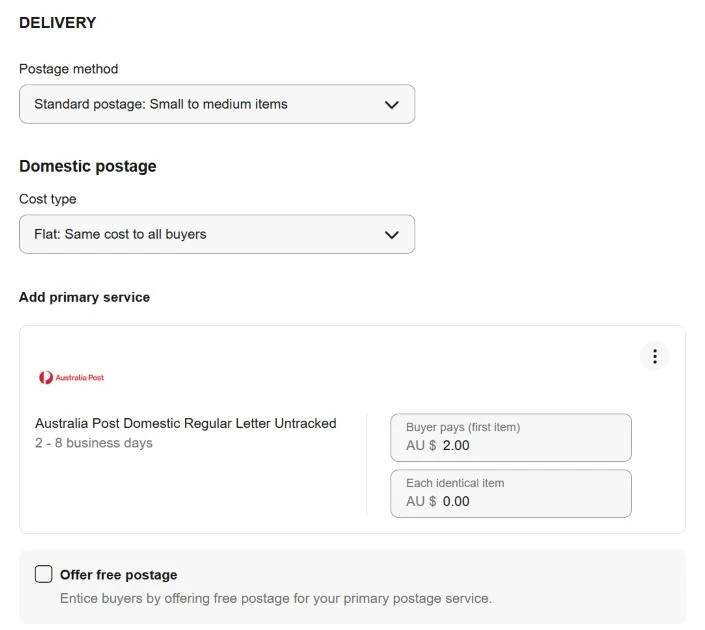 12345
- 1Leave Standard postage: Small to medium items.
- 2Flat: Same cost to all buyers, so every buyer in Australia pays the same.
- 3The service you just added appears here.
- 4Buyer pays (first item): what the envelope, toploader and stamp really cost you ($2.00 is only an example). Each identical item: $0.00.
- 5Leave Offer free postage unticked unless you’ve built postage into your card prices.
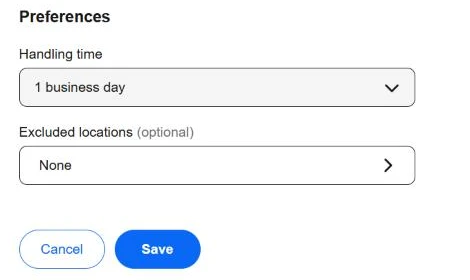 123
- 1Scroll down to Handling time. It starts on 2 business days: pick 1 business day if you post the next day.
- 2Excluded locations can stay None.
- 3Press Save.
Tip: Want one postage charge when a buyer grabs several different cards? Set up combined postage in My eBay under Shipping preferences.
Step 5 of 7 · about 2 min
Create a tracked postage policy for valuable cards
Make a second postage policy, named something like Tracked parcel. Tracking proves delivery if a buyer says a card never arrived.
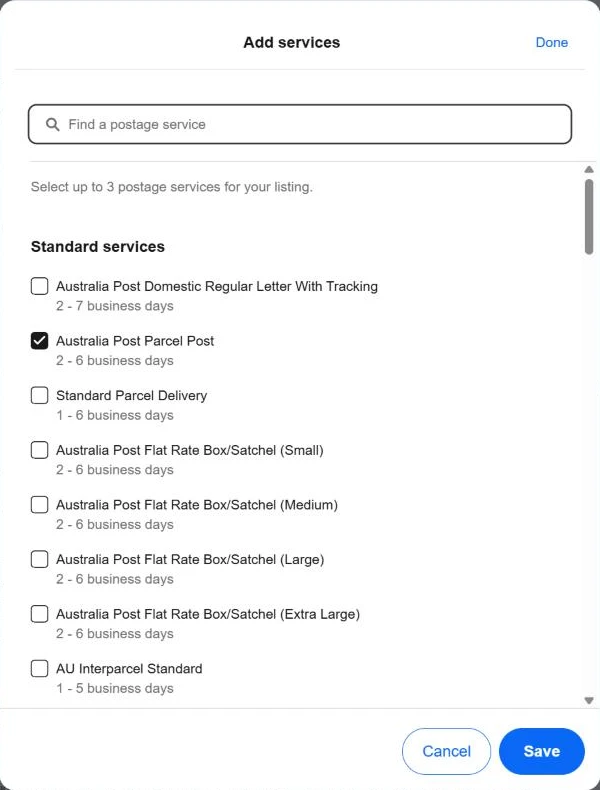 123
- 1Australia Post Parcel Post (or a courier you use) for slabs, hits and big orders.
- 2Regular Letter With Tracking suits a single valuable card in an envelope.
- 3Press Save, then set the cost and handling time like the letter policy.
Tip: In bulkcard you choose which postage policy each batch uses, so you can keep both.
Step 6 of 7 · about 2 min
Create a return policy
eBay needs a return policy on every listing, even if you don’t accept returns. Choose Create policy → Return.
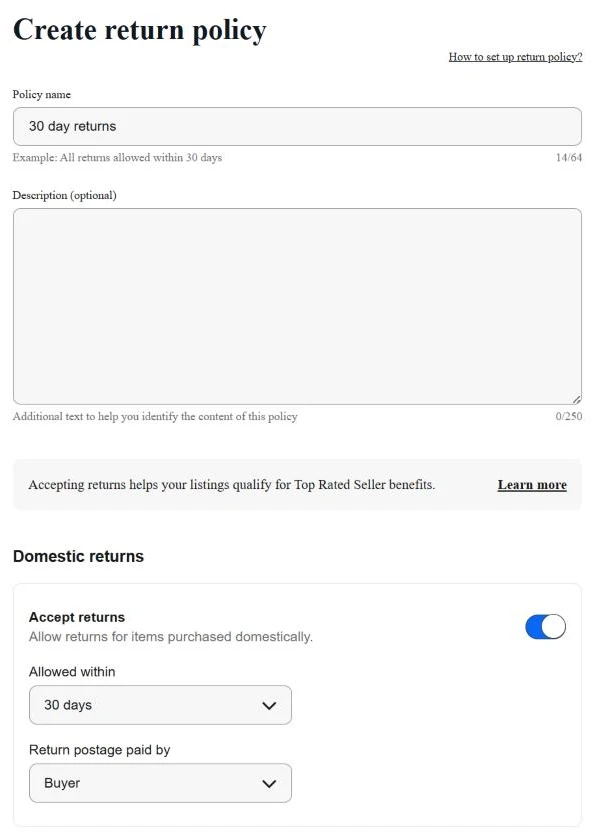 1234
- 1Name it after the rule, like 30 day returns.
- 2Switch on Accept returns under Domestic returns. Buyers trust it, and it helps you qualify for Top Rated Seller benefits.
- 3Allowed within: 30 days (eBay also offers 60).
- 4Return postage paid by: Buyer. Leave International returns off unless you post overseas, then press Save.
Watch out: Even with returns switched off, eBay’s Money Back Guarantee and Australian Consumer Law still cover a card that isn’t as described.
Step 7 of 7 · about 1 min
Pick your policies in bulkcard
In bulkcard, open Settings → eBay account. Your policies load from eBay each time the page opens. Pick one of each, check every option starts with AU ·, then press Save eBay settings.
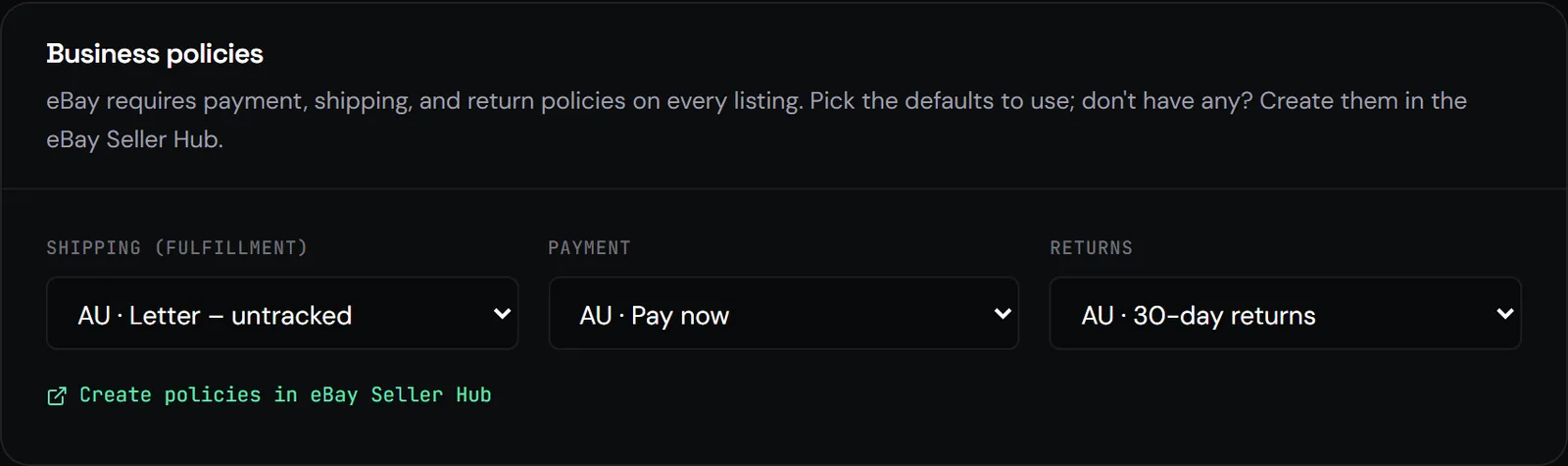
Tip: On the publish screen you can swap the postage policy for one batch: letters for commons, tracked for hits.
Before you publish
You’re done when
- Business policies turned on
- One payment policy with immediate payment
- A letter postage policy (untracked) and a tracked one
- One return policy
- All three picked in bulkcard, each starting with “AU ·”
Troubleshooting
When something goes wrong
- Business policies not selected
- Pick all three in Settings → eBay account, then save.
- A policy shows “US ·” or “UK ·”
- That policy belongs to another eBay site. Pick your AU one, or create it on ebay.com.au.
- A renamed policy is missing
- Open Settings → eBay account and pick it again under its new name.
- You changed a policy on eBay
- Every listing that uses it updates too. Make a new policy if you only want new listings to change.
Still stuck? Ask in the bulkcard Discord or email hello@bulkcard.com.au.